PERFEKTASTEROIDS3D

Apple Vision Pro · visionOS 2.0 or later

The asteroid field is
all around you.

A fully immersive take on the arcade classic. Fly an endless corridor that never stops — hold a hand up and the ship follows it, pinch to shoot — or hold position while rocks sweep past your head on real orbits and swing back around.

Free during beta · No account, no ads, no tracking · Works entirely offline

Built for the headset

Your hands are the controls. Hold one up to fly, pinch to shoot, aim with your eyes. A game controller works too, if you would rather — and your hands keep working alongside it.

Physics you can feel

Rocks in the classic modes travel closed orbits, so nothing pops into existence or vanishes, and flight there is Newtonian — you drift until you burn. The corridor has its own weight and momentum.

Ranked, if you want

Seven Game Center leaderboards — a board for each mode, plus weekly and daily boards for Rush. Sign in, or do not; the game is the same either way.

Generated, not drawn

Every asteroid, the ship, the starfield and every sound is created the moment the game launches. Nothing is the same twice.

Four ways to play

One endless corridor, and three points of view on the classic field. Score and ships carry across if you switch between the orbital modes mid-run.

Mode 01 · the main one

Asteroid Rush

The ship carries you forward and never stops. Dodge what is coming, shoot what you can, and gather the supplies that keep you alive — fuel, energy, missiles, repairs. Running dry does not kill you outright: the engine fails, you coast, and a fuel canister brings it back.

Hold an open hand up and the ship follows it. You do not pinch to fly, so a pinch is free to be a trigger: one hand fires the laser, the other launches homing missiles. Or plug in a game controller and fly with the stick — your hands keep working either way.

Sectors escalate. Armoured rocks shrug off lasers until the plating comes off, volatile ones chain, hunters steer toward you. Ten named encounters appear as you go, from a comet crossing to a precision gauntlet, and there are experience levels, six unlockable loadouts, fifteen medals, a daily seeded challenge and local leaderboards behind it.

Everything is kept on your device. Nothing is uploaded, and there is nothing to buy.
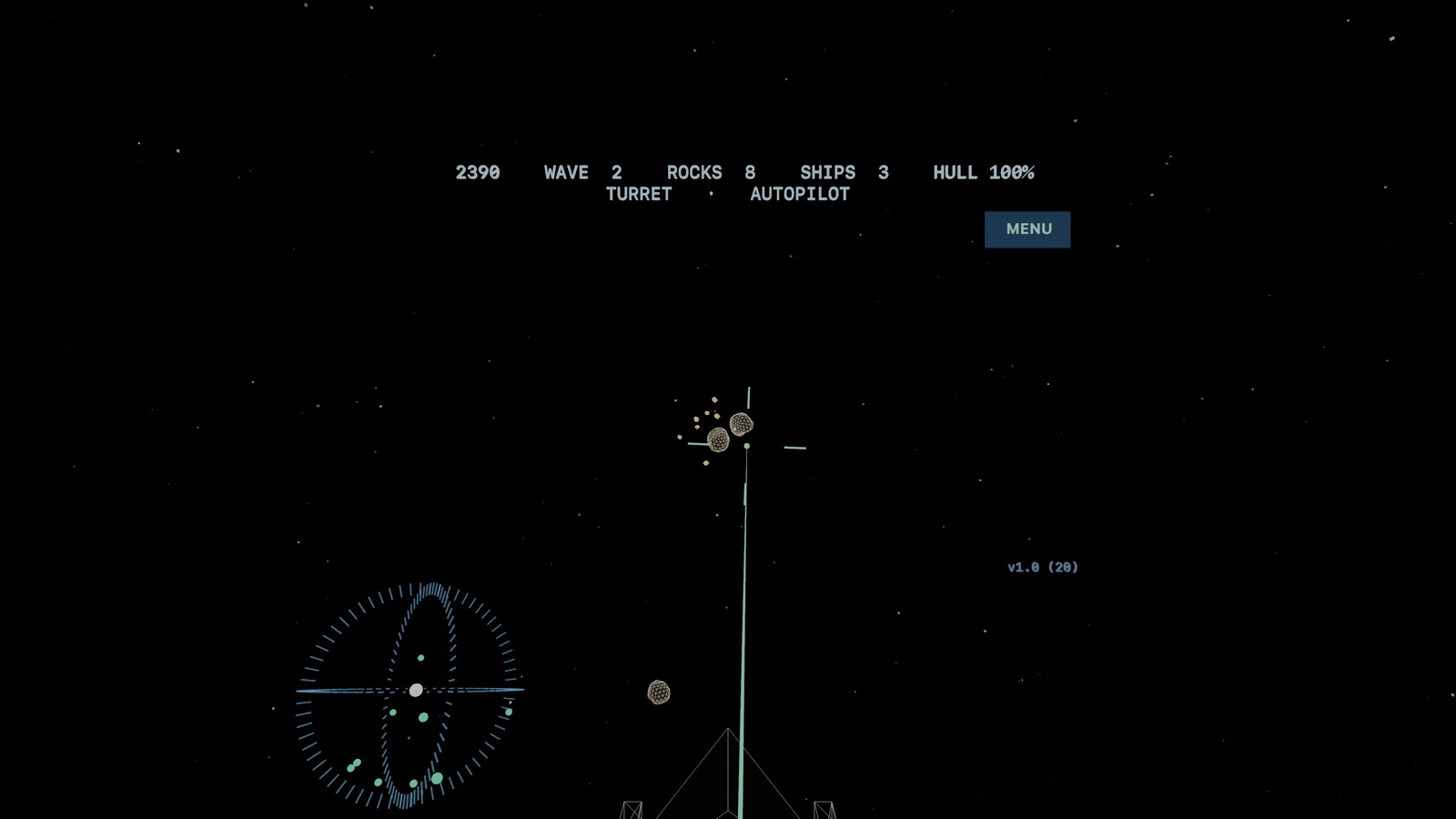
The turret view: wireframe asteroids drifting against stars, a targeting cross on one of them, a threat radar at lower left and a status line across the top.

Mode 02

Turret

You hold position at the centre of the field while rocks orbit around you — above, below and behind. Look at one and pinch to fire. Hold the pinch to keep firing.

The one to start with. No flying, just aim and survive.

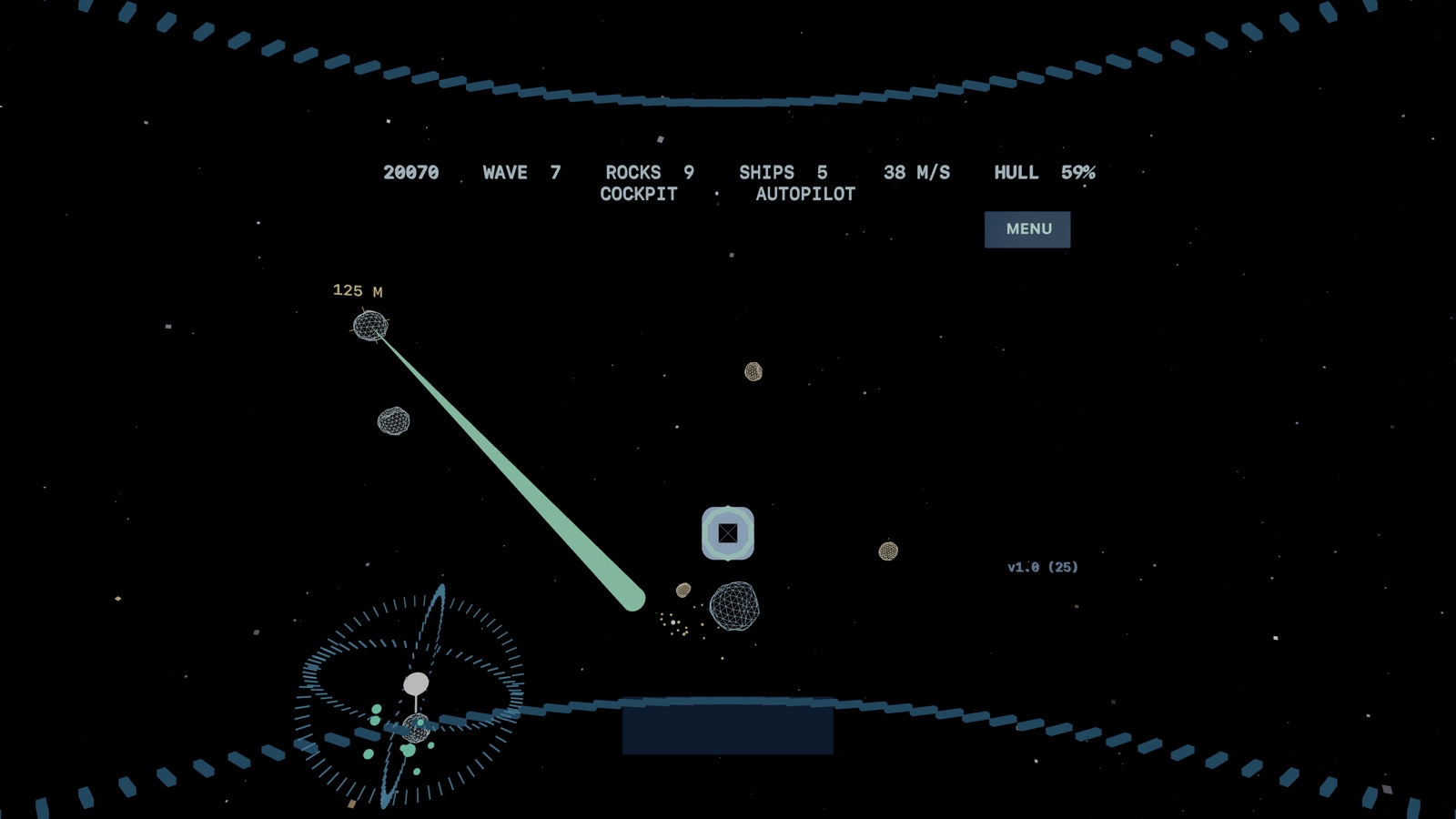
The cockpit view: a canopy frame around the edge of the view, a laser tracer running from a gun below the sight to a distant asteroid marked with its range in metres.

Mode 03

Cockpit

First person, from inside the canopy. Fly the field yourself: your left hand becomes a flight stick, your right hand shoots wherever you look. A locked rock shows its range in metres.

Momentum is conserved. Turning changes where you point, not where you go.

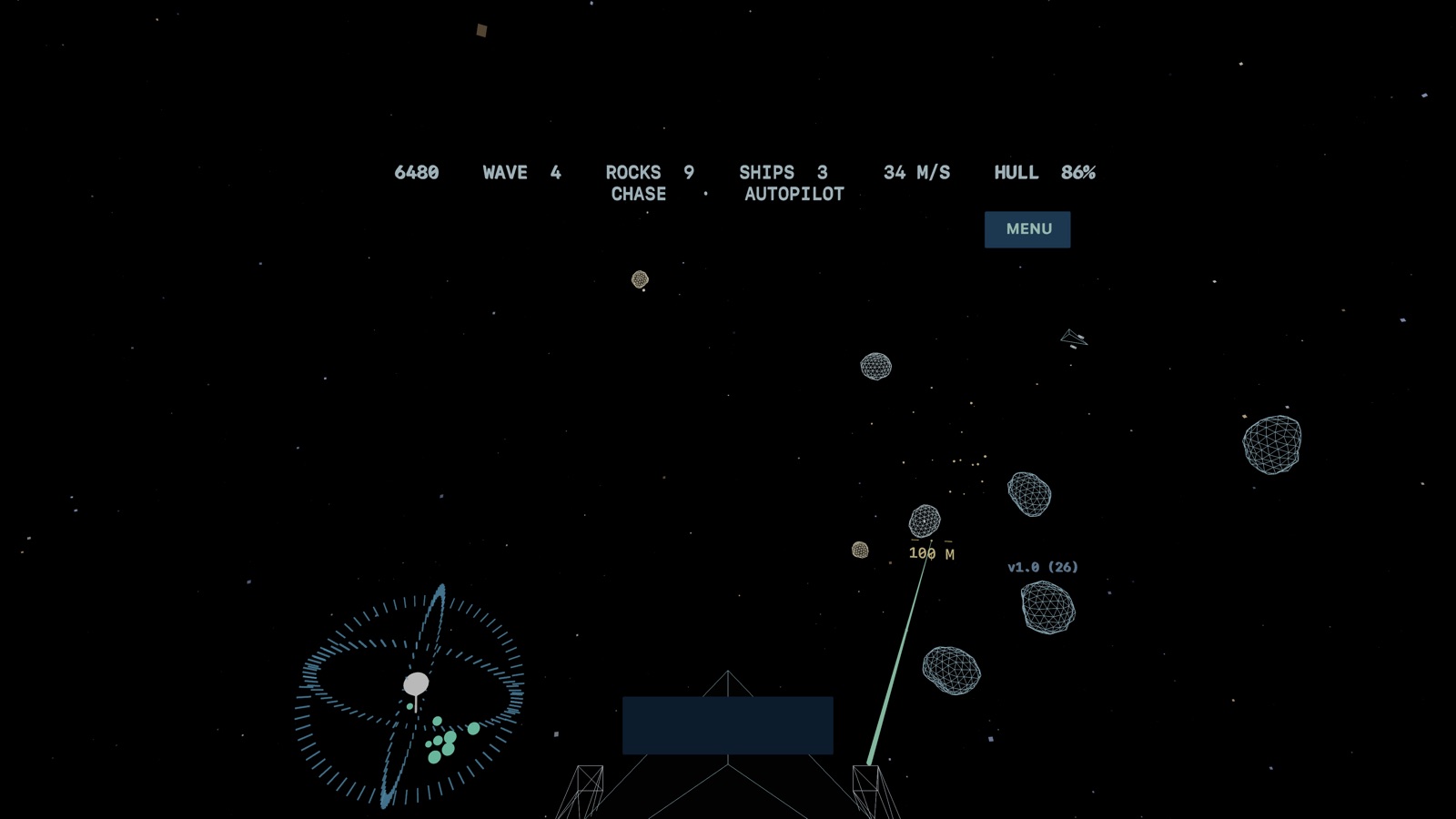
The chase view: the wedge-shaped ship seen from behind and above, low in the frame, with asteroids ahead and a laser leaving one of its gun pods.

Mode 04

Chase

Your ship flies ahead of you and the camera follows it. Same controls as the cockpit, but you can see the hull bank into its turns and the fire leaving its gun pods.

Classic Asteroids, if the screen were the size of the sky.

How to play

Hands and eyes, or a game controller if you would rather. Play seated, with room to turn.

Asteroid Rush

Hold an open hand up
The ship follows it. No pinching to fly — move your hand left, right, up or down and the ship goes there.
Lower it and raise it again
Re-centres, if your arm gets tired. Wherever it comes back to becomes the new middle.
Pinch
Fires. One hand is the laser, the other launches a missile — which hand is which is yours to set.
Fly through supplies
Restores fuel, energy, missiles and hull. Watch the fuel.

Leaderboards

Sign in to Game Center
The game offers once, when it starts. Decline and nothing changes — the game plays exactly the same.
Seven boards
Asteroid Rush all-time, this week and today; furthest flight; and one each for Turret, Cockpit and Chase.
Scores go up on their own
At the end of a run, quietly, in the background.
Leaderboards button
On the main screen once you are signed in.

With a controller

Left stick
Flies the ship — the corridor in Rush, yaw and pitch in the flight modes, and turning in the turret.
Triggers
Right fires, left launches missiles.
A and B
Thrust and retro brake, in Cockpit and Chase.
Hands still work
The pad takes the ship only while you are steering with it, and gives it back when you put it down. You can steer with your hands and fire with a trigger.

Turret

Look at a rock
It lights up as you focus on it.
Pinch
Fires at whatever you are looking at.
Hold the pinch
Keeps firing.

Cockpit & Chase

Left hand — pinch, then move
A spring-centred stick. Where your hand sits relative to where you pinched sets how fast you turn. Bring it back to stop turning.
Push away / pull back
Throttle. Push to burn, pull through centre for retro thrusters.
Right hand — pinch
Shoots wherever you are looking. Rest your aim on a rock for a second to lock on.

Reading the display

Status line
Score, wave, rocks left, ships and hull integrity.
The orb at your left
A threat radar. The white arrow is you and which way you face; dimmed dots are rocks behind you.
The ring ahead
Your flight path — the direction you are actually travelling, which is rarely where the nose points.
MENU, top right
Pause, restart or quit. Look at it and pinch.

Staying alive

Listen
Rocks passing close by are audible, and where they sound is where they are. Headphones help a great deal.
Watch the hull
Damage depends on mass and closing speed. A large rock hit head-on is far worse than a glancing scrape.
Mind your charge
Lasers deplete and recharge. Empty the bank and the guns cut out until they recover.
Difficulty
Easy, Normal and Hard change rock count, speed, ships, recharge rate and how many rocks are aimed straight at you.

Install the beta

The game is in open beta through TestFlight, Apple's official testing app. It is free, and takes about two minutes to set up.

  1. Check your device

    You need an Apple Vision Pro running visionOS 2.0 or later. This game does not run on iPhone, iPad, Mac or any other headset — it is built for spatial hardware and needs eye tracking and hand tracking to be playable.

  2. Install TestFlight on the headset

    Open the App Store on your Vision Pro, search for TestFlight, and install it. Sign in with the same Apple Account you use on the device.

  3. Open the invitation link

    Open this link in Safari on the Vision Pro:

    Tap Start Testing, then Install. No invitation code is needed.

  4. Launch it

    Open Perfekt Asteroids 3D, pick a mode and a difficulty, and press Launch. The game takes over your view completely, so sit down first and give yourself room to turn.

It is a beta, and it behaves like one

Builds change often. TestFlight will tell you when a new one is ready; the version number is shown in the corner of the game while you play, which is the quickest way to check what you actually have installed.

Found something broken, or something that simply feels wrong? Use Send Beta Feedback in TestFlight — it attaches a screenshot, which is worth a great deal.

Questions

Does it work on iPhone, iPad or Mac?

No. It is visionOS only, and only for Apple Vision Pro. The whole game is built around looking at a target and pinching, in a space that surrounds you — there is nothing to port to a flat screen.

Do I need to stand up or walk around?

No, and you should not. Play seated. You will want to turn your head and upper body freely, so leave yourself room, but the game never asks you to move through the room.

Will it make me feel unwell?

The turret mode keeps you stationary and is the gentlest starting point. The flight modes move you through space, which some people find uncomfortable at first. Start with Turret, keep sessions short to begin with, and stop if you feel off.

Does it need an internet connection?

Only to install. The game itself runs entirely on the device, collects nothing and sends nothing.

Why does everything look hand-drawn?

Because none of it is drawn at all. Every asteroid, the ship, the stars and every sound effect are generated by code when the game starts, in the spirit of the vector arcade cabinets the game descends from.

Ready?

Free while it is in beta. Open on your Vision Pro.

Join the beta on TestFlight